
Your screen may be too small for an optimal experience on this site.
Create your own songbook of lyrics, chords, tabs, Guitar Pro, backing tracks and more for your rehearsals, performances, worship events, student lessons or live-streams.
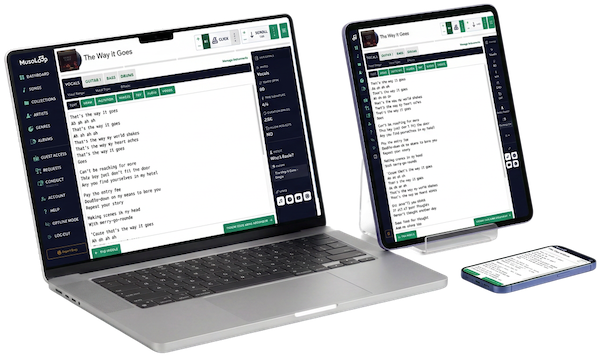
MusoLoop helps musicians, teachers, and bands organise their songs in one place. You can store lyrics, chords, tempo, key, and structure for every song — and group them into collections or set lists. It’s designed to make rehearsing, performing, and teaching music smoother and more connected.
MusoLoop offers flexible subscription options so you can choose what suits your budget. Each option comes with a risk-free 30 day trial.
Keep all your lyrics, chords, set lists, and tabs in one place.
Scroll your song content live, synced to tempo, so you never miss a cue.
Share structured song notes with students and optimise your lesson time.
Give bandmates access to the exact version of each song.
No more hunting through screenshots or scribbled notes.
Cloud-based and ready on stage, in the studio, or at home. Built for performance.
| Feature | MusoLoop | Songsterr | BandHelper | OnSong | Ultimate Guitar | Setlist Helper | Chordify | Stage Traxx 4 | Easy Performer |
Paper Notes |
|---|---|---|---|---|---|---|---|---|---|---|
| Add Lyrics & Chords | Yes | Partial | Yes | Yes | Yes | Yes | Yes | Yes | Yes | Yes |
| Guitar Pro (.gp), MusicXML & Notation Support | Yes | Yes | No | No | No | No | No | No | No | No |
| Existing Song Library Learn more |
No | Yes | No | No | Yes | No | Yes 36M+ songs, AI-detected | No | No | No |
| Auto-Scroll | Yes | Yes | Yes | Yes | Yes | No | Yes | Yes | Partial LRC timed lyrics | No |
| Built-in Metronome | Yes | Yes | Yes | Yes | Yes | No | No | Yes | No | No |
| Backing Tracks Click, cues & stems |
Yes | Partial Their song library | Yes | Yes | Partial Official & Pro tabs | Partial One file per song | No | Yes | Partial One track at a time | No |
| Live Audience Requests Including paid requests |
Yes | No | No | No | No | No | No | No | No | No |
| Works on Internet Browsers No app needed |
Yes | Yes | No | Partial iOS only | Partial App for full features | No | Yes | No | No | No |
No single tool is right for everyone. The others each shine in their own way, and MusoLoop is no different — it keeps your songs, media, and notation in one easy place, ready on any device, with live requests and guest access along for the ride. If that fits how you play, teach, or perform, we’d love for you to give it a try.
Save 10%
Our tools make performing and rehearsing a breeze

Auto-scroll the text content as you play a song. You can adjust the speed to suit your device size, and auto-scroll when the page loads. Magic!

Our metronome keeps you in time with visual & audio clicks. Set your tempo with +/–, and use Auto to start the click for every song.

Choose a font size that suits your screen, your viewing distance, and your eyes — Small, Medium, or Large – with our font size controls.
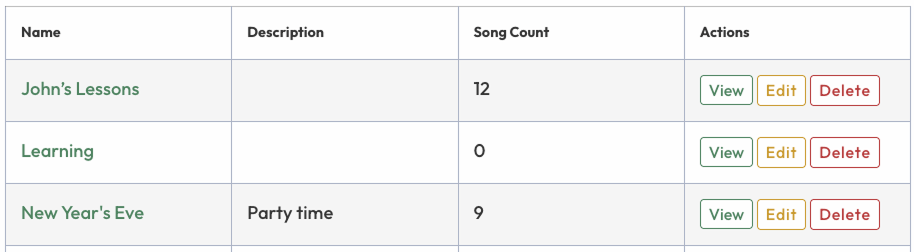
Organise your songs into Collections for use as set lists for gigs, lesson plans for students, jam nights with friends… whatever you like!
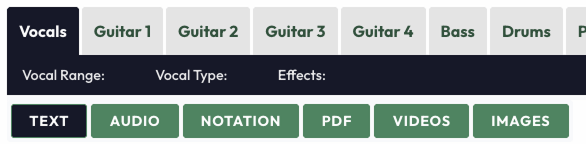
Jump between text, audio, notation, PDFs, videos, or images for each instrument — everything you need for each song, right where you’d expect it.
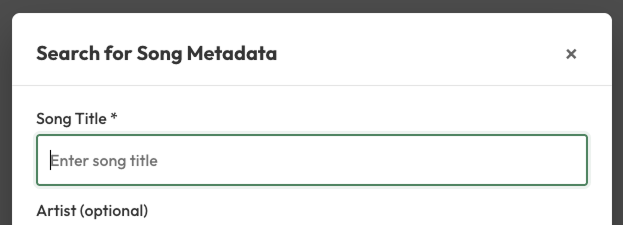
Enter a song title & artist then quickly pull in the key metadata i.e. lyrics, tempo etc. Less manual entry, more time making sweet music.
MusoLoop is built with you, not just for you. Every jam, rehearsal & gig inspires the way we grow. Here’s what fellow musicians think about using MusoLoop to keep their music organised and ready to play.


Learn about the features that make MusoLoop a creative space for building and managing your music notes.
Absolutely. MusoLoop is fully responsive, so you can access your songs anywhere — on stage, in rehearsal, or in class and on any device that has an internet browser i.e. Windows, Mac, Android, iPhone, iPad etc.
MusoLoop is a website that you access via an internet browser, and deliberately so. We want a cohesive experience for all users; whether on iOS, Android, Windows, Mac or other operating systems. We built MusoLoop as a website for the widest audience and for accessibility on a wider range of devices. It also saves on development costs which means cheaper pricing for our customers.
Yes, you can upload audio files (.mp3) as backing tracks. You can upload a click, cue, and either a full band or individual tracks.
Absolutely. Your data is stored on Australian servers and backed up every hour, so your work is always protected. The site is secured at the front end by Cloudflare, and the hosting runs on enterprise-grade DELL-powered infrastructure with a DDoS-protected network and 100% Australian servers and support. In short, your music is in safe hands.
We have a few more ideas in the pipeline but our direction is also in your hands. We’ve built MusoLoop to scratch our own itch but if you want to be a part of MusoLoop’s future please get in touch at [email protected]
Yes. You can request deletion of your account and personal data by emailing [email protected]. See our Privacy Policy for full details on what we store and how removal requests are handled.
Yes. You can add metadata to songs, such as Artist, Genre, Key, Album etc., then use a keyword search to quickly find what you need. You can even create your own Collections (i.e. set lists) to keep your songs organised for gigs, rehearsals, or lessons, and sort Songs alphabetically by metadata terms.
No. MusoLoop cannot fetch chords, tabs, or sheet music for you because of copyright restrictions. You add your own musical content. If you type chord names in a song, MusoLoop can show guitar chord diagrams when you hover or tap them — but it will not look up or import full arrangements for you.
When you use Fetch Song Info while editing a song, MusoLoop can search public music databases and fill in details such as title, artist, album, genre, duration, and an estimated tempo. It may also fetch lyrics when available. It does not provide chords, notation, or downloadable audio files.
Yes. You can invite band mates, students, or other collaborators. They can view songs for free or, for an additional cost, they can edit songs, collections, albums etc. We want to make keeping in-sync with your peers easy.
MusoLoop needs an internet connection to run, so it’s worth making sure you’ve got reliable WiFi or mobile data at the venue. Most gig spaces are well covered these days, but if you’re playing somewhere with patchy signal, it’s a good idea to check ahead so everything’s ready when you hit the stage.
Absolutely. MusoLoop is built to flex with how you play. Solo performers love having everything in one place on stage, while bands can share collections and give each member access to the exact version of every song. Add students into the mix with guest access, and the same tool covers your gigs, rehearsals, and lessons.
Sorry, no. We can’t import data from other sources. We know nobody wants to re-type their whole repertoire but you can build songs really quickly using our metadata lookup, which pulls in details like lyrics and tempo from just a title and artist — so there’s far less manual entry than you’d expect.
Not at the moment — songs can’t currently be exported from MusoLoop. It’s something we may look at down the track, but for now your content lives safely within your account, ready to access from any device whenever you need it.
Requests is our live gig feature that turns your audience into part of the show. You choose which songs from your library are available, then share a link or print the built-in QR poster for the venue. Fans scan it, search your songs, and send a request — no app or account needed. Requests land in your real-time queue instantly, so you can see what the room wants and mark songs as played as you go.
Nope — that’s the beauty of it. Your audience simply scans the QR code or opens the link, picks a song, and submits. There’s no download, no login, and no learning curve. They can optionally leave their name and a message, and we’ll email them a confirmation if they choose to share an address.
Yes, if you’d like to. Connect a Stripe account and you can offer optional “boost” tiers that move a request up the queue. Tips are always optional for your audience, and Requests works perfectly well as a free feature if you’d rather not enable them. Payments are handled securely through Stripe.
We want to make MusoLoop the best it can be, so we rely on regular cash flow to pay our team of talented coders and for our infrastructure, all of which get more expensive due to inflation. Lifetime deals limit the growth of innovation so we don’t offer them. Thanks for your understanding.
No worries. You have 30 days to try it out and you can cancel anytime. We’re always improving MusoLoop based on user feedback. Our goal is to make it intuitive and enjoyable, not complicated. If you’re stuck on something please reach out at [email protected].
Your 30-day trial gives you full access so you can try MusoLoop properly. When it ends, you can simply choose a plan to keep going. If you decide it’s not for you, that’s completely fine — just let your subscription lapse. Your songs and data are stored in MusoLoop case you change your mind later.
Every plan includes one editor (you) plus unlimited guest users with read-only access — perfect for students or bandmates who just need to view content. If you’d like additional people to be able to edit songs and collections too, you can add extra editors for a small fee per editor. It’s a flexible way to share the workload without paying for more than you need.
Here To Help
Explore our resources